
A Shopify page builder with an AI agent

Shopify pages, built by you and an AI agent.

Describe the page you want, paste a screenshot or a link, and Spark builds the sections. Fine-tune every detail in a visual editor, then publish straight into your theme as native sections.

Free plan available Billed through Shopify No app proxy, no iframes

  • Works with Online Store 2.0 themes like Dawn and Horizon
  • Text editable and translatable in Shopify
  • Rendered by Shopify, like the rest of your theme
How it works

From an idea to a live page in three steps.

No code and no copy-and-paste between tools. Spark keeps the whole page, from first prompt to published theme files, in one place.

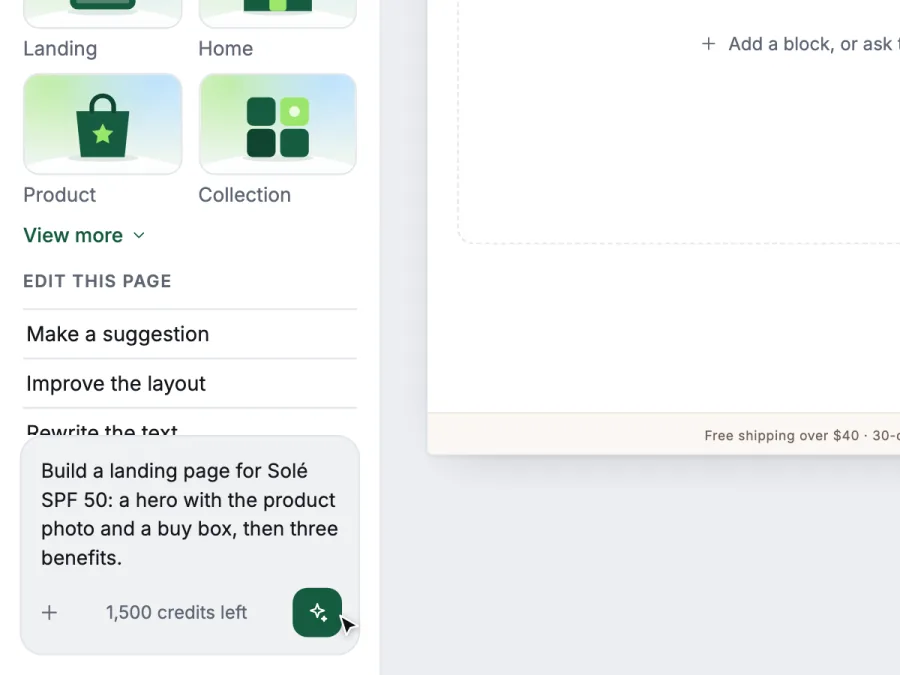
  1. Spark's Agent tab, with a prompt for a Solé SPF 50 landing page typed into the box.
    01

    Describe

    Type what you want, paste a screenshot of a page you like, or drop in a link. Or start from a template.

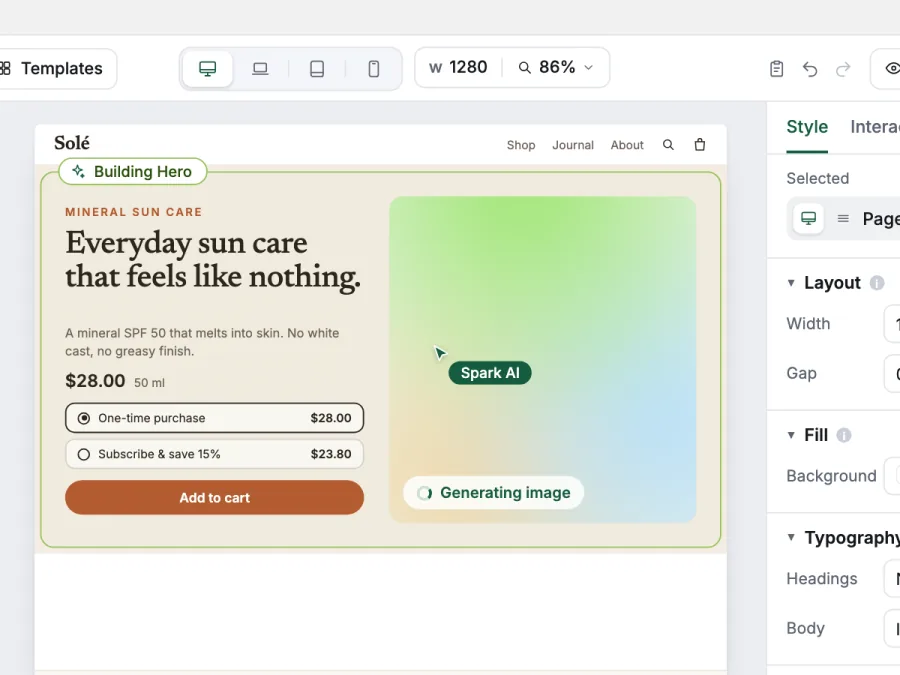
  2. The agent building a hero section on the canvas, outlined in green, while it generates the product image.
    02

    Build

    The agent builds the sections. You shape them with drag and drop, per-device design and live store data.

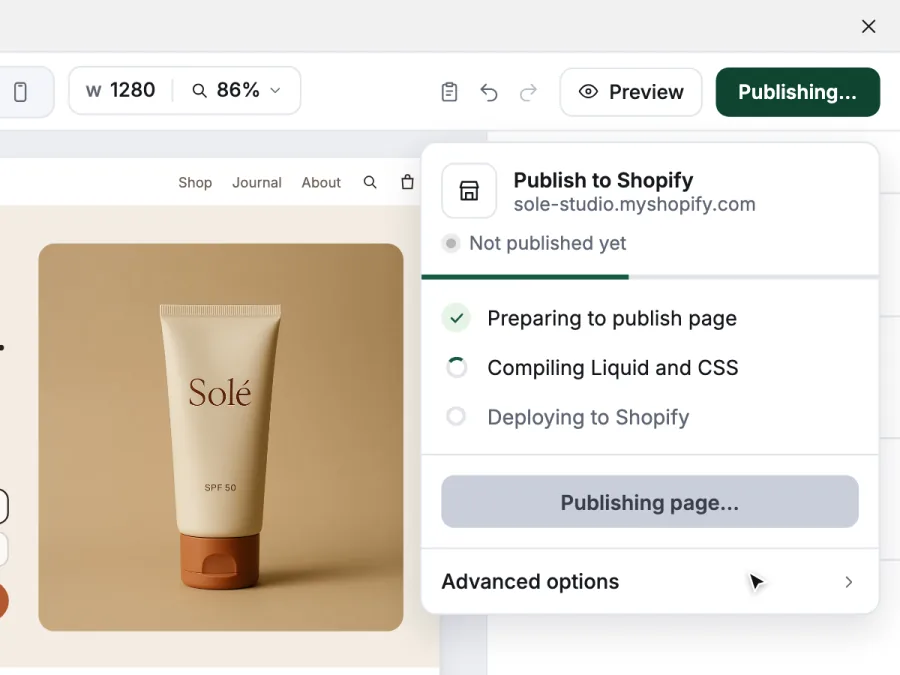
  3. Spark's Publish to Shopify panel, compiling Liquid and CSS.
    03

    Publish

    One click writes the page into your theme as a native section, a JSON template and a CSS file.

AI agent

Ask for a page. Get real, editable sections.

The Spark agent works inside the editor, on the same blocks you do. Select any block and choose Ask AI, or describe a whole page. You watch it plan, build and check its work, and you can undo any change.

  • Build or edit from a prompt. A new page, a new section, or a change to the block you selected.
  • Start from a screenshot or a link. The agent recreates the layout with your content.
  • Generate images and rewrite copy. New product shots, shorter headlines, a different tone.
  • Fix layouts for phones. Tidy the mobile version without touching desktop.
  • Stay under Shopify's limits. Near the size limit, it suggests how to shrink the page.

Agent requests use AI credits. Every plan includes some; see pricing.

Visual editor

A precise editor for every screen size.

Insert blocks, arrange them in layers, and style them in the inspector. Switch between desktop, laptop, tablet and mobile, and change what needs changing on each.

  • Responsive by device. Change direction, spacing or size on mobile only, and desktop stays as it is.
  • Layers and drag and drop. Move, nest, hide and duplicate blocks from the canvas or the layer tree.
  • Style, interactions, settings. Every block has the same three tabs, so nothing is hard to find.
  • Four breakpoints

    Design each page for the screens your customers use, with overrides that apply to one device only.

  • Interactions and animation

    Reveal sections as they scroll into view, or add sticky bars that follow the shopper.

  • Visibility conditions

    Show a block only when a product is sold out, for certain customer tags, or in chosen countries.

  • Version history

    Go back to an earlier version of a page whenever you need to.

  • Page size meter

    See how close a page is to Shopify's file limits before you publish, not after.

  • Blocks for real stores

    Grids, galleries, sliders, tabs, accordions, variant pickers, custom Liquid and more, all styled to match your brand.

Native theme sections

Your pages live in your theme, not in an app.

When you publish, Spark writes the page into your theme as regular theme files. Shopify renders them like any other section, so there is no app proxy and no iframe between your shoppers and your page.

  • Edit and translate in Shopify. Text shows up in the theme editor and in Shopify's translation tools.
  • Light on the storefront. One CSS file per page, plus a small shared script that loads deferred and minified.
  • Careful with your theme. Spark only writes its own files and never replaces theme files it didn't create.
  • sections/…liquid

    One section file per page

    The page's layout as a Liquid section, built from Spark's blocks.

  • templates/…json

    A JSON template

    Holds the page's text and settings, so it is editable in the theme editor.

  • assets/…css

    A CSS file

    The page's design for every device, in one stylesheet.

  • assets/…js

    A small shared script

    Shared by all Spark pages, minified and loaded deferred.

Shopify data and apps

Connected to your store and the apps you already use.

Pages show live products, prices and subscriptions, not screenshots of them. Your review, bundle and email apps fit right in.

Live Shopify data

Connect any block to your catalogue. When a price, variant or product photo changes in Shopify, the page follows.

  • Products
  • Variants
  • Selling plans
  • Collections
  • Blog posts
  • Metafields

Variant pickers, galleries and add to cart work on the live store, including custom cart drawers.


App widgets and App island

Pick an app and a widget from the list, or drop any app block into an App island and place it anywhere on the page.

  • JMJudge.me
  • LOLoox
  • OKOkendo
  • YOYotpo
  • STStamped
  • KLKlaviyo
  • OMOmnisend
  • KAKaching Bundles
  • RBRebuy
  • IOInfinite Options
  • IFInstafeed
  • +Any app block

App names are trademarks of their owners. Spark isn't affiliated with or endorsed by them.

Templates

Start from a template, make it yours.

Pick a starting point from the template library, then change anything by hand or with the agent.

  • Landing pages

    Launches, campaigns and offers.

  • Product pages

    Galleries, variants and details.

  • Listicles and advertorials

    Long-form pages for paid traffic.

  • Homepages and collections

    Tell your brand's story.

  • Saved sections

    Save a section you like and reuse it on other pages.

  • Section, cart and navigation templates

    Not just full pages: start a header, footer or cart from a template too.

  • Unlimited drafts

    Try ideas freely. Drafts are unlimited on every plan; only published pages count.

Page types

One builder for every page in your store.

Build standalone pages or the templates Shopify uses for every product, collection and post.

  • Landing pages

    Launches, campaigns, bundles and ad traffic.

  • Home page

    Rework your store's front page, section by section.

  • Product templates

    Variant pickers, galleries, subscriptions and reviews.

  • Collection templates

    Custom layouts around a collection's products.

  • Blog posts

    Stories, guides, listicles and advertorials.

  • Cart page

    A cart page that looks like the rest of your store.

  • Header

    Your logo and navigation, designed your way.

  • Footer

    Links and store details, designed your way.

  • Coming soon page

    What visitors see while your store is password protected.

Pricing

Simple plans. Start free.

Every plan includes the visual editor and the AI agent. Plans differ in AI credits and how many pages you can publish.

Free

Try Spark on a real page.

$0/month

Free forever

100 AI credits, once

  • 1 landing page
  • 1 product template
  • 1 blog post
  • 1 saved section
  • Unlimited drafts
Start free

Starter

For a store with a few key pages.

$29/month

Billed monthly

1,500 AI credits a month

  • Unlimited landing pages and blog posts
  • Home page
  • 5 product and 5 collection templates
  • Cart, header, footer and coming soon page
  • 20 saved sections
  • Unlimited drafts
Choose Starter

Business

For large catalogues and teams.

$100/month

Billed monthly

10,000 AI credits a month

  • Everything unlimited: every page and template type
  • Unlimited saved sections
  • Unlimited drafts
Choose Business

Prices in US dollars Billed through your Shopify invoice Page limits count published pages; drafts are unlimited Need more AI credits? Buy a pack in the app. Packs never expire.

FAQ

Questions, answered plainly.

Will Spark slow down my store?

Spark pages are regular theme sections that Shopify renders on its own servers, the same way it renders the rest of your theme. There is no app proxy and no iframe. Each page adds one CSS file, and all Spark pages share one small script that is minified and loads deferred.

How fast a page is still depends on what you put on it, like large images, videos or third-party app widgets.

Does it work with my theme?

Spark publishes into Online Store 2.0 themes, including Shopify's Dawn and Horizon. Pages pick up your theme's header, footer and settings. If you're unsure about a heavily customised theme, try it on the Free plan first; drafts are unlimited.

Can I still edit text in Shopify's theme editor?

Yes. Text on Spark pages shows up in the theme editor and in Shopify's translation tools. Spark is the source of truth for layout and design, so the next publish from Spark replaces other theme changes, but by default it keeps text you edited in the theme editor. You can turn that off per page.

What are AI credits?

Credits pay for the AI agent's work, like building sections, generating images or rewriting copy. The Free plan includes 100 credits once. Paid plans add credits every month. If you run out, you can buy a credit pack in the app; packs never expire. The visual editor itself doesn't use credits.

Can I use my reviews, bundle or email app on Spark pages?

Yes. Spark has widgets for apps such as Judge.me, Loox, Okendo, Yotpo, Stamped, Klaviyo, Omnisend, Kaching Bundles, Rebuy, Infinite Options and Instafeed. For any other app that provides a theme app block, use an App island to place that block anywhere on your page.

Will Spark change files in my theme that it didn't create?

No. Spark writes and updates its own files: each page's section, template and CSS, plus a shared script. It won't overwrite theme files it didn't create.

What happens if I uninstall Spark?

Your plan is cancelled through Shopify. Before you uninstall, you can use Clean theme in Spark's settings: it removes Spark's files from your theme and puts back any templates Spark replaced. Uninstalling doesn't delete theme files by itself, so clean first if you want them gone. If you come back later, you start on the Free plan.

Do I need to know how to code?

No. You build with blocks, the inspector and the AI agent. Spark writes the Liquid, JSON and CSS for you when you publish.

How does billing work?

Plans are billed by Shopify, on your regular Shopify invoice, in US dollars. Pay monthly, or yearly to save 20%. You can change plans from inside the app.

Build your next page with Spark.

Start on the Free plan. Build a landing page, a product template and a blog post, and publish them to your theme.

Install on Shopify